
Notion, Airtable and Coda look like three answers to the same question: where does the team keep the work? Underneath, they bill in three different units. Notion charges per member. Airtable charges per person who can edit a record. Coda — since 8 July 2026, Superhuman Docs — charges only the people who make docs, and lets everyone else in for free.
That single difference is worth more than every feature comparison on the internet. So I priced the same team on all three: ten people, three of whom build the workspace and seven who update it. List prices only, read from each vendor’s own page on 25 November 2026, annual billing converted to a monthly figure, tax excluded. The same ten people came to $99, $200 and $200 a month — and once the AI meter starts running, not in the order you would guess.
The photo at the top is by Bench Accounting (CC0, via Wikimedia Commons, cropped) — a real desk, which is where all three of these bills eventually get paid.
Quick comparison: what you are actually buying
| Notion | Airtable | Superhuman Docs (Coda) | |
|---|---|---|---|
| Entry team plan | Plus $10 per seat/month, billed annually ($12 monthly) | Team $20 per seat/month, billed annually ($24 monthly) | Pro $12 per Doc Maker/month, billed annually ($15 monthly) |
| Plan most 10-person teams land on | Business $20 ($24 monthly) | Team $20 ($24 monthly), or Business $45 ($54 monthly) | Business $33 ($40 monthly) |
| Who gets charged | Every workspace member. Guests are free but only see pages they are invited to. | Every user with edit permission on at least one base. Read-only collaborators and share links are free. | Doc Makers only. Editors and viewers are free. |
| Free plan ceiling | Limited blocks, 5MB uploads, 512MB storage, 10 guests, 7-day history | 1,000 records per base, 5 editors, 100 automation runs | No size limit on personal docs, limited shared docs, low automation quota |
| AI included | Business: 1,500 Standard + 500 Select credits per member/month | Free 500 credits per editor; Team 15,000; Business 20,000 per paid user | Docs AI included on paid plans while it is in beta |
| SSO | Business | Business (SAML) | Enterprise only |
| The real ceiling | Block storage and 512GB file storage | 50,000 records per base on Team, 125,000 on Business | No published row or doc-size cap on paid plans |
Read that table again and notice what is not a row: a per-row price. None of the three sells you storage or rows directly. They sell access, and the row limits are there to make the cheaper plan uncomfortable at some point.
Notion: one seat per human, and the AI starts at Business
Notion’s model has not changed: Free, Plus at $10 a seat a month billed annually ($12 monthly), Business at $20 ($24), Enterprise by quote, and a 20% discount for paying the year up front. Guests are free, which sounds like a loophole until you read the fine print: guests only see the individual pages they are invited to and cannot see teamspaces at all. For contractors and clients that is perfect. For your own staff it turns the wiki into a pile of links.
The line that matters in 2026 is the AI line. Plus includes a trial of Notion AI, not the product. If you want Notion Agent, custom agents, AI meeting notes and the credit allowances that come with them, the floor is Business at $20 a seat. That is a 100% increase on the entry plan, and for a ten-person team it is the difference between $100 and $200 a month before anyone asks a question.
Business also brings 1,500 Standard and 500 Select AI credits per member every month, SAML SSO, granular database permissions and 90-day version history. The two credit pools are deliberately separate and do not roll over: Standard is for work where Notion picks the model, Select is for when you pick one yourself or run your own agent. When they run out, the feature pauses unless an owner opens the workspace’s own credit balance.
That balance costs $10 per 1,000 credits on monthly billing and $13 per 1,000 on annual billing — Notion’s own FAQ says the annual credits are not cheaper, just more flexible. Notion estimates a simple task at about 5 credits, a medium one at 10 and a complex one at 25 when the model router is on Auto. Do the arithmetic on your own team before you assume AI is included: 4,000 credits per person a month sounds generous until it is 160 complex tasks.
Airtable: pay per editor, then hit the record wall
Airtable’s pricing page is honest about the unit: you pay for every user who has edit permission on at least one base. Commenters, form submissions, share links and read-only collaborators cost nothing. Team is $20 a seat a month billed annually ($24 monthly); Business is $45 ($54). The gap is not small, and it buys SSO, an admin panel, two-way sync, 125,000 records per base instead of 50,000, and 20,000 AI credits per paid user instead of 15,000.
The caps are where Airtable differs from the other two. Go past 50,000 records on Team and you do not get an overage invoice — you simply cannot add another record until you upgrade. Your data stays, the base keeps working, and the person entering next week’s orders is blocked. Automations have the same shape: 100 runs a month on Free, 25,000 on Team, 100,000 on Business, per workspace, with 75 to 200 automations per base. The API follows: 1,000 calls a month on Free, 100,000 on Team, unlimited on Business.
For a small team those numbers are fine. For a team that treats Airtable as the operations database — orders, inventory, tickets — 50,000 records arrives faster than anyone expects, and the upgrade is $25 a seat more, not a top-up.
The AI allowance is the most generous of the three on paper: 500 credits per editor on Free, 15,000 per paid user on Team, 20,000 on Business, and 25,000 at list price on Enterprise Scale. Extra credits come in packs of 10,000 to 200,000, starting at $20 a month for 10,000. The catch is the same one as everywhere else: a credit is not a unit of work you can compare across vendors, and Airtable’s AI fields and agents spend them at rates that depend entirely on what you ask them to do.
One add-on is easy to miss when you budget: Portals. Guest access for people outside the workspace starts at $120 a month for 15 guests on Team and $150 on Business, or $127.50 on the annual Business plan. If your plan involves showing a client a filtered view of their own orders, that is a line item, not a feature.
Coda is now Superhuman Docs, and it still bills by the maker
The biggest change in this comparison is a rename. Coda joined the Superhuman suite when Grammarly became Superhuman in October 2025, and on 8 July 2026 it became Superhuman Docs. coda.io redirects to docs.superhuman.com. Your docs, tables, formulas and Packs are unchanged, and existing Coda customers keep their current plan and price unless they choose to move to the Superhuman bundle.
What did not change is the billing trick that makes it interesting here. You pay only for Doc Makers — the people who create docs and pages. Editors are free, and an Editor is not a read-only guest: they can edit pages, add tables and views, write formulas, press buttons, configure Packs and automations. They just cannot create a new doc or page. Viewers are free too.
The published list prices are Pro $12 per Doc Maker a month billed annually ($15 monthly) and Business $33 ($40). Pro removes the doc-size cap and adds the usual polish; Business is where automations become unlimited, version history becomes unlimited, and private folders, subfolders and doc locking appear. The Free plan keeps personal docs unlimited in size but limits shared docs and gives automations a low quota.
One bonus is easy to overlook: on annual billing the paid plans include Grammarly, and on monthly billing it is $15 a Doc Maker extra. If your team already pays for a writing assistant, that is real money folded into the $33.
Two catches are worth saying out loud. SAML SSO is Enterprise-only — if your IT policy requires it, this comparison ends with a sales call, because Notion and Airtable both ship SSO on their mid-tier plans. And Docs AI, the built-in assistant, is included on paid plans only while it is in beta, with a fair-use policy and Doc Maker-only access. Unlimited AI is a lovely deal right now and a pricing announcement waiting to happen.
The same ten people, priced three ways
Three builders, seven contributors. The builders write the pages and design the bases; the contributors add records, update statuses and comment. Nobody is a passive reader, and nobody outside the company needs access.
| Plan | Who you pay for | Monthly (annual billing) | Year one |
|---|---|---|---|
| Notion Plus | 10 members | $100 | $1,200 |
| Notion Business | 10 members | $200 | $2,400 |
| Airtable Team | 10 editors | $200 | $2,400 |
| Airtable Business | 10 editors | $450 | $5,400 |
| Docs Pro | 3 Doc Makers | $36 | $432 |
| Docs Business | 3 Doc Makers | $99 | $1,188 |
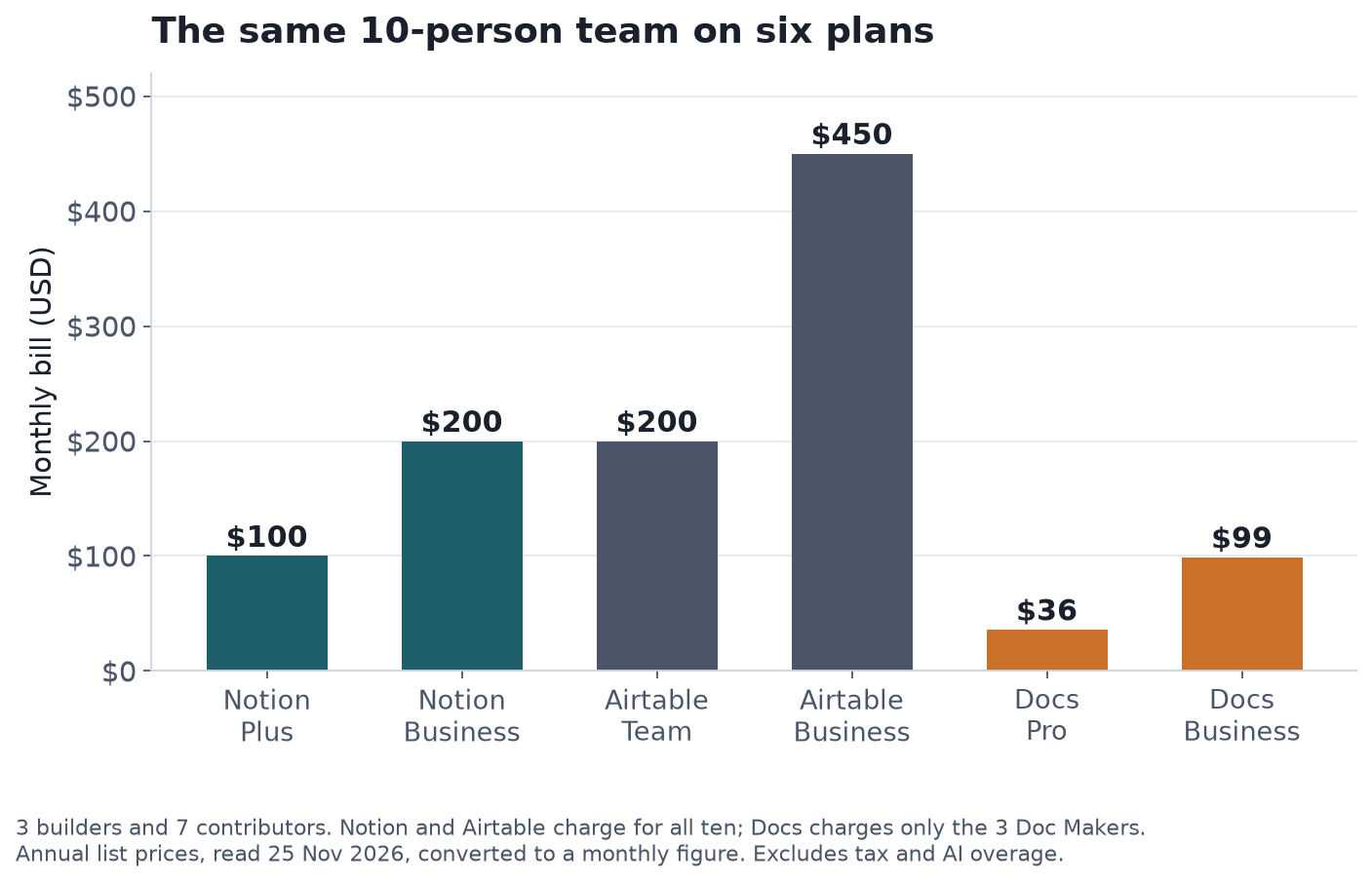
The $101 gap between Docs Business and Notion Business is not a discount. It is the seven contributors, priced at zero instead of $20 each, plus a $33 unit instead of a $20 one for the three people who do pay. Reverse the ratio and the bargain evaporates: if all ten people need to create pages, Docs Business is $330 a month and Notion Business is $200.
That gives a clean rule of thumb. At $33 a maker against $20 a member, Docs is cheaper as long as fewer than about 60% of the team needs to create docs or pages. Above that line, per-seat pricing wins.
What the bill does as the team grows
I ran the same 30% ratio up to 50 people. The two per-seat tools follow the headcount exactly — at $20 a seat, Notion Business and Airtable Team land on identical numbers at every size, which is a useful reminder that their difference is in what the seat allows, not what it costs. Docs climbs at a third of the slope.
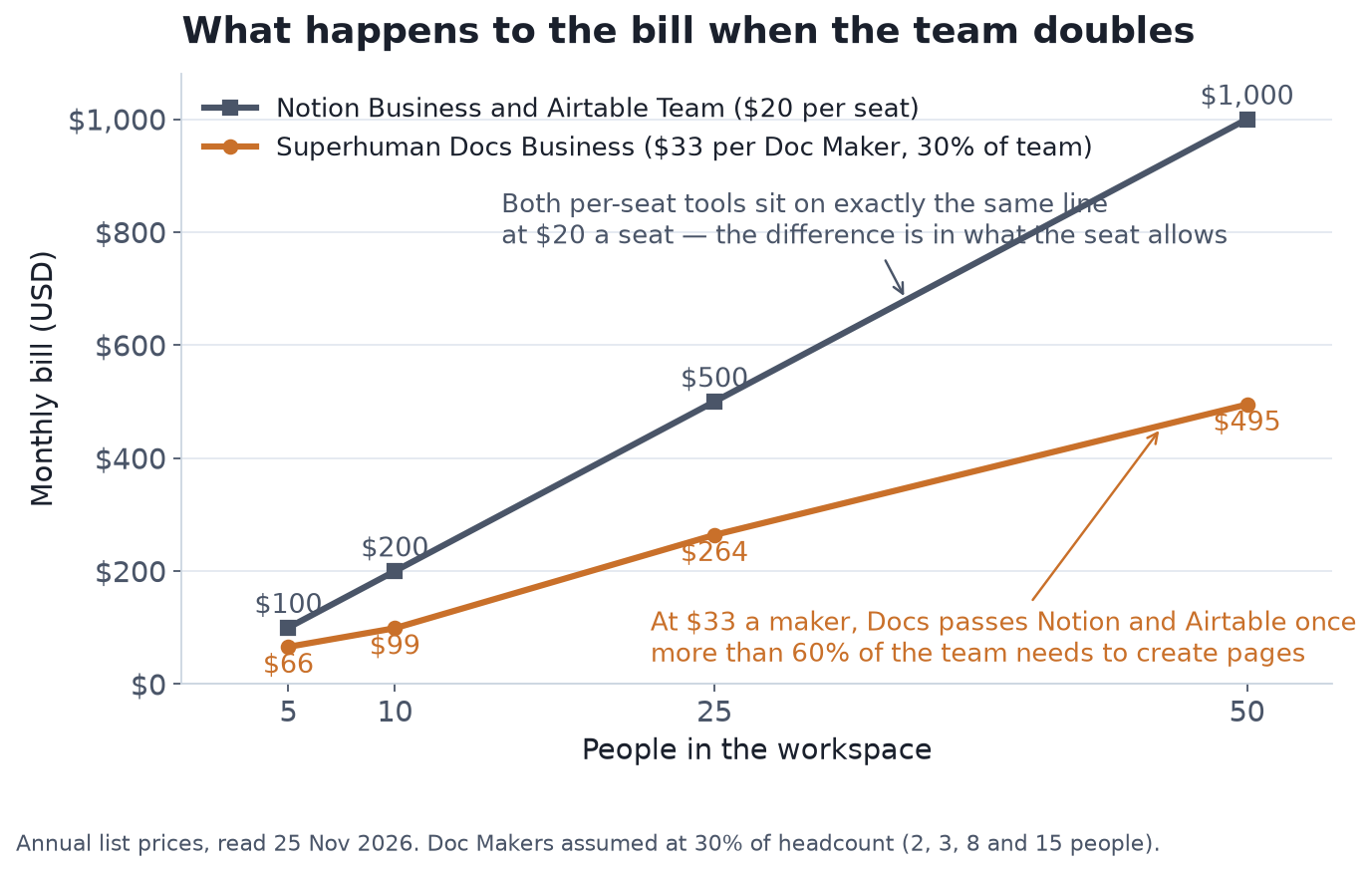
At 25 people with eight makers, Notion Business and Airtable Team each cost $500 a month; Docs Business costs $264. At 50 people with fifteen makers it is $1,000 against $495. If your company is mostly people who read and update rather than build, the maker model quietly halves the software line in your budget — and if it is mostly builders, it quietly doubles it.
The seven people who never build anything
This is the number I would put in front of any founder choosing between the three. Take the contributors alone: seven people who need to find a page, tick a box, add a row, leave a comment.
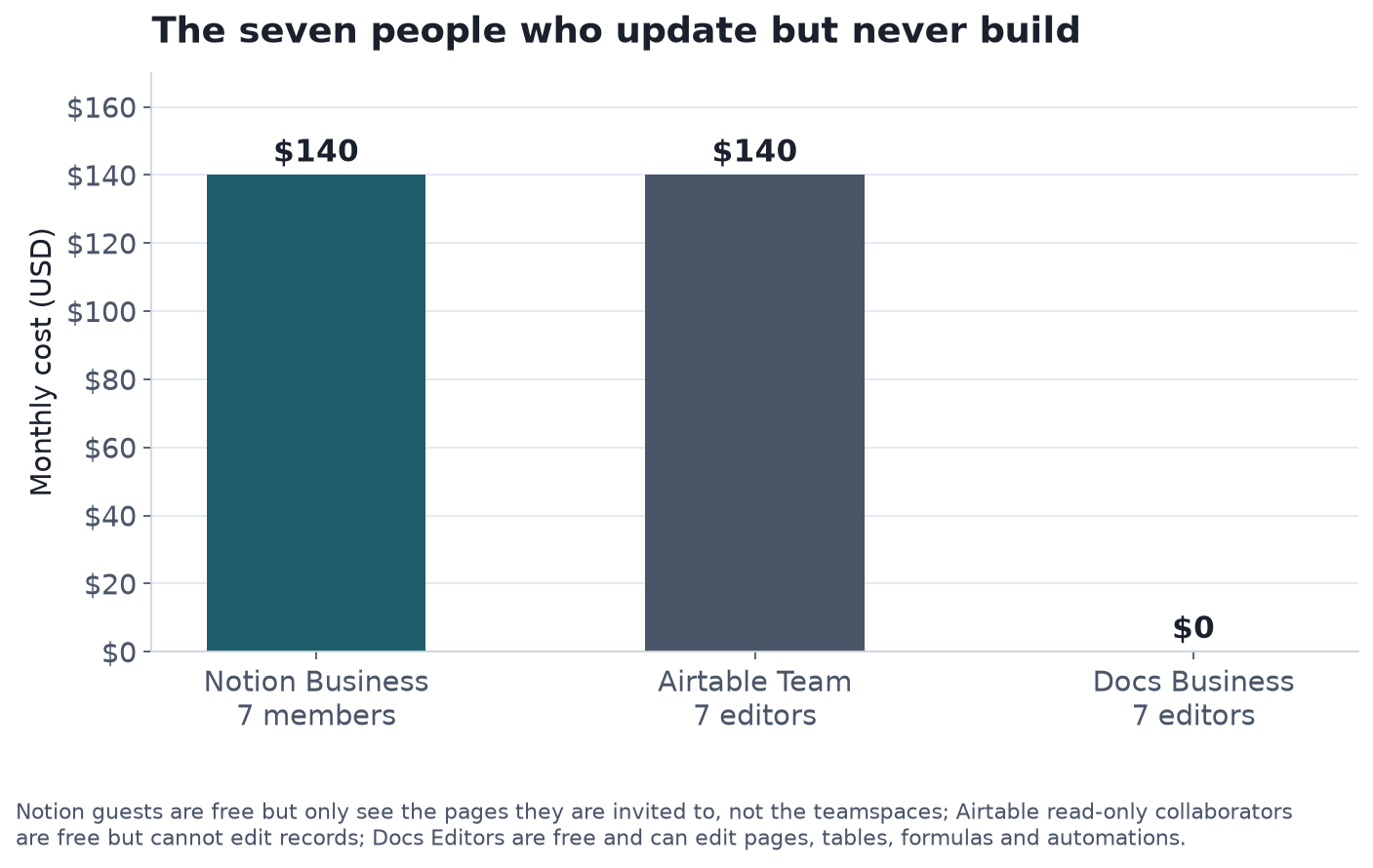
On Notion those seven cost $140 a month as members, or $0 as guests who cannot see a teamspace. On Airtable they cost $140 as editors, or $0 as read-only collaborators who cannot change a record. On Docs they cost nothing and can edit, filter, comment and run automations — they simply cannot create a new doc. For an operations team where a handful of people design the system and everyone else works inside it, that is the difference between a $200 bill and a $99 one, every month, for as long as the company exists.
AI is a second meter, and it is priced three ways
In 2026 the subscription is only half the story. Notion and Airtable both moved to credits; Docs is still giving AI away inside the plan while the feature is in beta. What each credit buys is not comparable — a Notion credit funds a model call routed by Notion, an Airtable credit funds an AI field or agent action — so compare the prices, not the credit counts.
| Platform | Included per month | Extra credits | Rollover |
|---|---|---|---|
| Notion Business | 1,500 Standard + 500 Select per member | $10 per 1,000 (monthly billing), $13 per 1,000 (annual) | No — resets monthly |
| Airtable Team | 15,000 per paid user (500 on Free, 20,000 on Business) | Packs of 10,000 to 200,000, from $20/month for 10,000 | No — allowance resets monthly |
| Docs Business | Docs AI included while in beta, fair use, Doc Makers only | No published per-credit price | Not applicable |
Run the Notion case forward. Ten Business seats include 15,000 Standard credits between them. If the team averages 4,000 credits a member — a handful of complex agent runs a day — the workspace uses 40,000 and needs 25,000 more. At $10 per 1,000 that is $250 on top of the $200 subscription, and the bill is $450 a month: $5,400 a year, against $1,188 for the same headcount on Docs Business.
That is not an argument that Notion is expensive. It is an argument that “AI included” means three different things, and the one that says unlimited while in beta is the one with a date on it. Budget the overage line before your team discovers the agent.
The limits that stop work, not the ones on the invoice
Price per seat is easy to compare. What each tier refuses to do is where the real upgrade pressure comes from, and it differs by platform.
| Notion Business | Airtable Team | Docs Business | |
|---|---|---|---|
| Rows and records | No published row cap; block storage is the limit | 50,000 per base, hard stop until upgrade | No published object cap; doc size unlimited |
| Automations | Database automations and buttons, no published run cap | 25,000 runs/month, 100 automations per base | Unlimited |
| Attachments | 512GB plus 10GB per added seat | 20GB per base | Unlimited |
| Version history | 90 days | 1 year | Unlimited |
| Single sign-on | Included | Business tier only ($45) | Enterprise only |
Notice that Airtable’s limits are the only ones that stop a person mid-task. Notion throttles you with storage; Docs simply does not publish a row cap. If your base is going to hold every order for three years, Airtable Team’s 50,000 records is a planning number, not a footnote.
How to choose
1. A wiki, a handbook, project notes, a company brain. Notion, and probably Business rather than Plus if you want AI at all. Per-member pricing matches how a company actually reads and writes documents, and the 90-day history plus SSO make it defensible to a finance team.
2. A database with a front end — inventory, orders, a CRM-lite. Airtable. Nothing else here gives you interfaces, two-way sync and per-record permissions in the same product. Budget for the record wall and, if you deal with clients, the Portals add-on.
3. A small team with a few builders and a lot of contributors. Docs. It is the only one of the three where the operations staff can edit the system without a licence, and at $99 for ten people it is the cheapest competent answer in this article.
4. A team that needs SSO but does not want Enterprise. Notion Business or Airtable Business. Docs makes you talk to sales, and that changes the budget conversation entirely.
Key takeaways
- Notion bills per member: Plus $10 and Business $20 per seat a month billed annually, with AI included only from Business.
- Airtable bills per editor: Team $20 and Business $45 per seat a month billed annually, with hard record caps at 50,000 and 125,000 per base.
- Coda became Superhuman Docs on 8 July 2026; Pro is $12 and Business $33 per Doc Maker, and editors are free.
- The same ten-person team costs $200 on Notion Business, $200 on Airtable Team and $99 on Docs Business — but $330 on Docs if everyone needs to create pages.
- AI is a second meter at Notion ($10 per 1,000 credits) and Airtable (packs from $20 per 10,000), and included only while Docs AI is in beta.
FAQ
1. Is Coda gone? No. Coda became Superhuman Docs on 8 July 2026, after joining the Superhuman suite when Grammarly rebranded in October 2025. Existing coda.io links redirect to docs.superhuman.com, and existing customers keep their plan and price unless they opt into the Superhuman bundle.
2. Why is Docs so much cheaper for ten people? Because you only pay for Doc Makers — the people who create docs and pages. Editors are free and can edit pages, build tables and views, write formulas and run automations; they just cannot start a new doc. The saving is real as long as most of the team does not need to create.
3. Can I keep everyone on Notion as a free guest? You can, but a guest only sees the individual pages they are invited to and never sees the teamspaces. That works for clients and contractors, not for staff who need to browse the wiki.
4. What happens when Airtable hits its record limit? You keep using the base and you never lose data, but you cannot add records until you upgrade. Automation runs and API calls are capped separately at the plan limit rather than billed as overage.
5. Does Notion Plus include Notion AI? No — Plus includes a limited trial. Agent, custom agents, AI meeting notes and the monthly credit allowances start on Business. Notion also separate Standard and Select credits, which cannot be pooled or transferred between members.
6. Are AI credits comparable between vendors? No. A Notion credit pays for a task routed through Notion’s model router, and Airtable’s credits pay for AI fields and agent actions. Only the list prices are comparable — $10 per 1,000 Notion credits versus $20 per 10,000 Airtable credits — not the amount of work a credit buys.
How these figures were checked
Every price was read on 25 November 2026 from the vendor’s own pricing page: notion.com/pricing (Free, Plus, Business and Enterprise prices in USD on both billing toggles, plus the plan feature table), Notion’s credit documentation ($10 per 1,000 monthly, $13 per 1,000 annual) and the AI credit guide (1,500 Standard and 500 Select per member, Auto task estimates); airtable.com/pricing (Team and Business prices on annual and monthly billing, record and automation limits, AI credits per paid user, credit pack sizes and prices, Portals add-on); and superhuman.com/plans/docs (Pro and Business per Doc Maker, monthly and annual, plus the feature table), with Superhuman’s rename notice for the 8 July 2026 change and the Maker billing explanation.
The monthly and annual totals are my arithmetic on those published rates for the stated team shapes (ten people with three builders; 30% builders at every headcount). They are estimates of an invoice, not quotes. They exclude tax, negotiated enterprise rates, startup credits, app-store billing and any add-on not named here. Annual billing is used throughout so the three platforms are compared on the same footing; paying monthly adds 20% at Notion, $4 a seat at Airtable Team and $7 a Doc Maker at Docs Business. Vendors change list prices without notice, and none of this is advice about your specific business.
If the workspace question is really a project-management question, our ClickUp vs monday.com vs Asana comparison prices the same kind of ten-person team on the tools that schedule the work.
Free · weekly
Get the AI tools brief
One email a week: what actually changed in AI automation — pricing moves, new agents, and the comparison sheets we build while testing the tools.
Free, no spam. Unsubscribe in one click.